0
How To Add leaderboard Adsense ads between Header and Post Section in blogspot
1.Log in to your dashboard--> layout- -> Edit HTML
2.Click on "Expand Widget Templates"
3.Scroll down to where you see this:
4.Now replace above code with below code.
5.Now save your template.
6.Go to Layout > Page Elements
7.Now Click on new 'Add a Gadget' option that will now have appeared between Blog Posts and the Header.
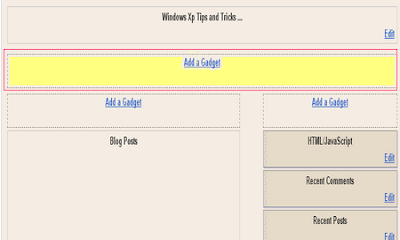
8.Select 'HTML/Javascript' and add your 728x90 leaderboard Adsesne code and click save.
read more
2.Click on "Expand Widget Templates"
3.Scroll down to where you see this:
4.Now replace above code with below code.
5.Now save your template.
6.Go to Layout > Page Elements
7.Now Click on new 'Add a Gadget' option that will now have appeared between Blog Posts and the Header.
8.Select 'HTML/Javascript' and add your 728x90 leaderboard Adsesne code and click save.
0
Recent Posts with Thumbnails for blogspot
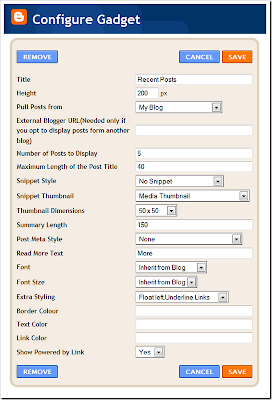
Its an updated version of Recent Posts Gadget.As the name suggests, this Gadget will help you to display the most Recent Posts on your Blog’s Sidebar. The Gadget has an options panel and can be configured to meet your wants. But you can override the colors if you want(this was done to support third party templates which doesn’t have the skin variables properly defined).

read more
Some samble of the Gadget with different configurations
0
read more
Auto Delete Temp Folder
Auto Delete Temp Folder
The Temporary Folder is used to store Some Temporary Files,that we uses & It wont Be deleted.Thereby it Wastes a lot of Space and Slow Down your System.So we must Regularly Delete those Files to make our System Run Fast.This Tweak Auto-Deletes the Content of Temporary Folder.After this tweak,Windows Puts a Temp File in that Folder & it will automatically Delete it when Itz Done!!
•Open Group Policy Editor.
•Navigate To Computer Configuration--->Administrative Templates--->Windows Components--->Terminal Services--->Temporary Folder.
•Den,Double Click Do Not Delete Temp Folder Upon Exit and and Disable it.
•Open Group Policy Editor.
•Navigate To Computer Configuration--->Administrative Templates--->Windows Components--->Terminal Services--->Temporary Folder.
•Den,Double Click Do Not Delete Temp Folder Upon Exit and and Disable it.
0
Sql Commands
Sql Commands
ABORT -- abort the current transaction
ALTER DATABASE -- change a database
ALTER GROUP -- add users to a group or remove users from a group
ALTER TABLE -- change the definition of a table
ALTER TRIGGER -- change the definition of a trigger
ALTER USER -- change a database user account
ANALYZE -- collect statistics about a database
BEGIN -- start a transaction block
CHECKPOINT -- force a transaction log checkpoint
CLOSE -- close a cursor
CLUSTER -- cluster a table according to an index
COMMENT -- define or change the comment of an object
COMMIT -- commit the current transaction
COPY -- copy data between files and tables
CREATE AGGREGATE -- define a new aggregate function
CREATE CAST -- define a user-defined cast
CREATE CONSTRAINT TRIGGER -- define a new constraint trigger
CREATE CONVERSION -- define a user-defined conversion
CREATE DATABASE -- create a new database
CREATE DOMAIN -- define a new domain
CREATE FUNCTION -- define a new function
CREATE GROUP -- define a new user group
CREATE INDEX -- define a new index
CREATE LANGUAGE -- define a new procedural language
CREATE OPERATOR -- define a new operator
CREATE OPERATOR CLASS -- define a new operator class for indexes
CREATE RULE -- define a new rewrite rule
CREATE SCHEMA -- define a new schema
CREATE SEQUENCE -- define a new sequence generator
CREATE TABLE -- define a new table
CREATE TABLE AS -- create a new table from the results of a query
CREATE TRIGGER -- define a new trigger
CREATE TYPE -- define a new data type
CREATE USER -- define a new database user account
CREATE VIEW -- define a new view
DEALLOCATE -- remove a prepared query
DECLARE -- define a cursor
DELETE -- delete rows of a table
DROP AGGREGATE -- remove a user-defined aggregate function
DROP CAST -- remove a user-defined cast
DROP CONVERSION -- remove a user-defined conversion
DROP DATABASE -- remove a database
DROP DOMAIN -- remove a user-defined domain
DROP FUNCTION -- remove a user-defined function
DROP GROUP -- remove a user group
DROP INDEX -- remove an index
DROP LANGUAGE -- remove a user-defined procedural language
DROP OPERATOR -- remove a user-defined operator
DROP OPERATOR CLASS -- remove a user-defined operator class
DROP RULE -- remove a rewrite rule
DROP SCHEMA -- remove a schema
DROP SEQUENCE -- remove a sequence
DROP TABLE -- remove a table
DROP TRIGGER -- remove a trigger
DROP TYPE -- remove a user-defined data type
DROP USER -- remove a database user account
DROP VIEW -- remove a view
END -- commit the current transaction
EXECUTE -- execute a prepared query
EXPLAIN -- show the execution plan of a statement
FETCH -- retrieve rows from a table using a cursor
GRANT -- define access privileges
INSERT -- create new rows in a table
LISTEN -- listen for a notification
LOAD -- load or reload a shared library file
LOCK -- explicitly lock a table
MOVE -- position a cursor on a specified row of a table
NOTIFY -- generate a notification
PREPARE -- create a prepared query
REINDEX -- rebuild corrupted indexes
RESET -- restore the value of a run-time parameter to a default value
REVOKE -- remove access privileges
ROLLBACK -- abort the current transaction
SELECT -- retrieve rows from a table or view
SELECT INTO -- create a new table from the results of a query
SET -- change a run-time parameter
SET CONSTRAINTS -- set the constraint mode of the current transaction
SET SESSION AUTHORIZATION -- set the session user identifier and the current user identifier of the current session
SET TRANSACTION -- set the characteristics of the current transaction
SHOW -- show the value of a run-time parameter
START TRANSACTION -- start a transaction block
TRUNCATE -- empty a table
UNLISTEN -- stop listening for a notification
UPDATE -- update rows of a table
VACUUM -- garbage-collect and optionally analyze a database
read more
ABORT -- abort the current transaction
ALTER DATABASE -- change a database
ALTER GROUP -- add users to a group or remove users from a group
ALTER TABLE -- change the definition of a table
ALTER TRIGGER -- change the definition of a trigger
ALTER USER -- change a database user account
ANALYZE -- collect statistics about a database
BEGIN -- start a transaction block
CHECKPOINT -- force a transaction log checkpoint
CLOSE -- close a cursor
CLUSTER -- cluster a table according to an index
COMMENT -- define or change the comment of an object
COMMIT -- commit the current transaction
COPY -- copy data between files and tables
CREATE AGGREGATE -- define a new aggregate function
CREATE CAST -- define a user-defined cast
CREATE CONSTRAINT TRIGGER -- define a new constraint trigger
CREATE CONVERSION -- define a user-defined conversion
CREATE DATABASE -- create a new database
CREATE DOMAIN -- define a new domain
CREATE FUNCTION -- define a new function
CREATE GROUP -- define a new user group
CREATE INDEX -- define a new index
CREATE LANGUAGE -- define a new procedural language
CREATE OPERATOR -- define a new operator
CREATE OPERATOR CLASS -- define a new operator class for indexes
CREATE RULE -- define a new rewrite rule
CREATE SCHEMA -- define a new schema
CREATE SEQUENCE -- define a new sequence generator
CREATE TABLE -- define a new table
CREATE TABLE AS -- create a new table from the results of a query
CREATE TRIGGER -- define a new trigger
CREATE TYPE -- define a new data type
CREATE USER -- define a new database user account
CREATE VIEW -- define a new view
DEALLOCATE -- remove a prepared query
DECLARE -- define a cursor
DELETE -- delete rows of a table
DROP AGGREGATE -- remove a user-defined aggregate function
DROP CAST -- remove a user-defined cast
DROP CONVERSION -- remove a user-defined conversion
DROP DATABASE -- remove a database
DROP DOMAIN -- remove a user-defined domain
DROP FUNCTION -- remove a user-defined function
DROP GROUP -- remove a user group
DROP INDEX -- remove an index
DROP LANGUAGE -- remove a user-defined procedural language
DROP OPERATOR -- remove a user-defined operator
DROP OPERATOR CLASS -- remove a user-defined operator class
DROP RULE -- remove a rewrite rule
DROP SCHEMA -- remove a schema
DROP SEQUENCE -- remove a sequence
DROP TABLE -- remove a table
DROP TRIGGER -- remove a trigger
DROP TYPE -- remove a user-defined data type
DROP USER -- remove a database user account
DROP VIEW -- remove a view
END -- commit the current transaction
EXECUTE -- execute a prepared query
EXPLAIN -- show the execution plan of a statement
FETCH -- retrieve rows from a table using a cursor
GRANT -- define access privileges
INSERT -- create new rows in a table
LISTEN -- listen for a notification
LOAD -- load or reload a shared library file
LOCK -- explicitly lock a table
MOVE -- position a cursor on a specified row of a table
NOTIFY -- generate a notification
PREPARE -- create a prepared query
REINDEX -- rebuild corrupted indexes
RESET -- restore the value of a run-time parameter to a default value
REVOKE -- remove access privileges
ROLLBACK -- abort the current transaction
SELECT -- retrieve rows from a table or view
SELECT INTO -- create a new table from the results of a query
SET -- change a run-time parameter
SET CONSTRAINTS -- set the constraint mode of the current transaction
SET SESSION AUTHORIZATION -- set the session user identifier and the current user identifier of the current session
SET TRANSACTION -- set the characteristics of the current transaction
SHOW -- show the value of a run-time parameter
START TRANSACTION -- start a transaction block
TRUNCATE -- empty a table
UNLISTEN -- stop listening for a notification
UPDATE -- update rows of a table
VACUUM -- garbage-collect and optionally analyze a database
Subscribe to:
Posts (Atom)


