Showing posts with label adsense. Show all posts
Showing posts with label adsense. Show all posts
0
How To Add leaderboard Adsense ads between Header and Post Section in blogspot
1.Log in to your dashboard--> layout- -> Edit HTML
2.Click on "Expand Widget Templates"
3.Scroll down to where you see this:
4.Now replace above code with below code.
5.Now save your template.
6.Go to Layout > Page Elements
7.Now Click on new 'Add a Gadget' option that will now have appeared between Blog Posts and the Header.
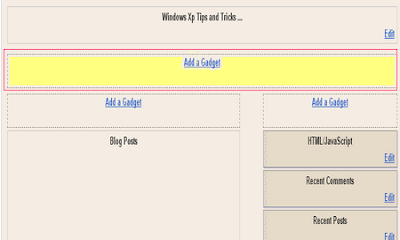
8.Select 'HTML/Javascript' and add your 728x90 leaderboard Adsesne code and click save.
read more
2.Click on "Expand Widget Templates"
3.Scroll down to where you see this:
4.Now replace above code with below code.
5.Now save your template.
6.Go to Layout > Page Elements
7.Now Click on new 'Add a Gadget' option that will now have appeared between Blog Posts and the Header.
8.Select 'HTML/Javascript' and add your 728x90 leaderboard Adsesne code and click save.
Subscribe to:
Posts (Atom)


