0
Add More Than 1000 Friends-got some solutions
see! below too much friends have added..you can do it very easily,no hard work need here .Go the step by step instrucion below
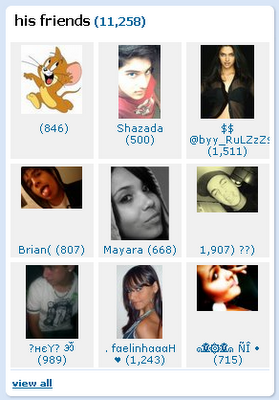
Follow this method to reach the 1000 friends limit

always request others to add you though. Here are the step by step instructions which they should
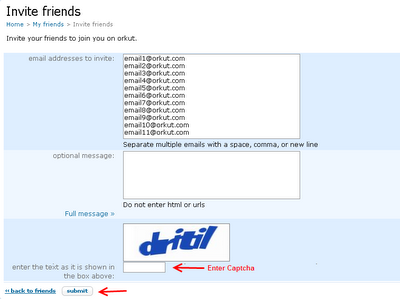
How can i Accept Friend requests – I Have Reached The Limit?but here some solutions right nw
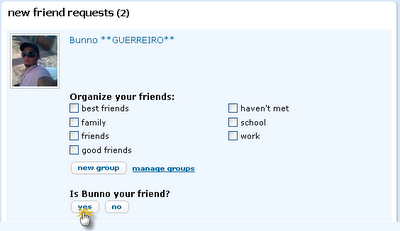
Choose the category and click yes to add as your friend.
read more
Follow this method to reach the 1000 friends limit
always request others to add you though. Here are the step by step instructions which they should
How can i Accept Friend requests – I Have Reached The Limit?but here some solutions right nw
Choose the category and click yes to add as your friend.
0
How can Add More Than 1000 Friends To Your Orkut Profile
Orkut confirms that one Orkut user’s profile can have a maximum of 1000 friends and hence, you cannot add more than 1000 friends to your Orkut profile. But in reality you can’t add more than 970 or 980 friends. The reason behind this is that we might be having some pending friendship requests in our profile. These pending requests are calculated towards our total friends count. But this is final, Orkut won’t allow you to have more than 1000 friends. Let’s do something to bypass Orkut restriction and add more than 1000 friends to our profile.
read more
- Go to www.orkut.com/Invite.aspx
- Enter email addresses of those persons whom you want to add as friends. (They should be active on Orkut)
- Fill up the word verification and Submit.
- Now Orkut will show you their Orkut profiles in a list manner. (This is because you tried sending invites to active Orkut users. Orkut won’t send invites to those emails associated with active Orkut profiles, it will rather prompt you with their Orkut profiles list)
- Check the boxes next to their Orkut profiles and click OK.
- Now they will receive your friendship request and once they accept your requests, they will get added to your list.
- You are done.
this way you can add more than 1000 friends in your Orkut profile. Now, don’t stay in limit, go ahead, make more friends and play with Orkut.cheer Up!!!!
0
Make Money with Facebook Ads
My good friend I am suban has opened the virtual doors to his new Infinite FB online course. The course focuses on Facebook Ads and how you can become a strong marketer by simply advertising your business or affiliate offers on Facebook.
Ian has been making money with Facebook Ads since it open, and along with Volk, Shoe and DK, the person I turn to when I need help with any Facebook
stuff.
The past couple days Ian has been giving great strategies on Facebook advertising. Today, he has a simple video talking about the main benefits of Facebook and what you will receive within Infinite FB and what to expect. The best part is he gives you a quick sneak peak at the backend of Infinite FB. Almost like a tease, but it does look sexy.
Facebook advertising is gaining in popularity and after watching Ian’s video series, you can tell he knows what he is talking about. Enjoy!
read more
Ian has been making money with Facebook Ads since it open, and along with Volk, Shoe and DK, the person I turn to when I need help with any Facebook
stuff.
The past couple days Ian has been giving great strategies on Facebook advertising. Today, he has a simple video talking about the main benefits of Facebook and what you will receive within Infinite FB and what to expect. The best part is he gives you a quick sneak peak at the backend of Infinite FB. Almost like a tease, but it does look sexy.
Facebook advertising is gaining in popularity and after watching Ian’s video series, you can tell he knows what he is talking about. Enjoy!
0
make money with adsense
you have interest in Blogging for cash – Adsense placement is very important. You need to quickly learn where to place the ad units to ensure that you get the maximum number of clicks that you can possibly get with the traffic that you have. In terms of earning money with AdSense, Blogging for Cash – AdSense Placement is vital!
There are many techniques that have been tested by top marketers, website owners, and bloggers since blogs and AdSense have come into existence. What they have found is that what works for one site or blog does not necessarily work for another site or blog – but certain principles, if followed, can significantly increase the number of clicks you will receive. This ultimately determines how much money you make with Google AdSense.
First, let’s dispel any myths about the placement of AdSense ad units. There is no one particular place that works better than all other places on all webpages for ad units. Some people will tell you to use Skyscrapers on the right hand side of the page. Others will tell you to use Skyscrapers on the left hand side. Still others will tell you to use the rectangular boxes at the top of the page. This is what works for THEIR sites, but it will not necessarily work for yours.
Where your ads are placed is largely determined by what your visitors are doing, and where their attention is focused on each of your pages. If your visitor’s attention will be focused on the right hand side of the page, then by all means use the skyscrapers on the right hand side of the pages. But if their attention is focused on the content of your blog posts, you might do better by copying and pasting the AdSense code into the middle of each post you make.
Look at your blog from a visitor’s point of view. Where is their attention? Have a friend or family member look at the page as well. Ask them what they see first. Ask them what part of the page – without any AdSense ads on it – they were most interested in. Find out what drew their attention and why.
In most cases, you do not want to get in your visitors way. However, if you are hoping to earn AdSense revenue, you need to get directly in their path in order to get your ads noticed – and clicked on. This is why so many people opt to put their AdSense code directly in their entries. When it comes to blogs that is usually where a visitors attention is focused – on the entries. Try putting the AdSense code directly in the middle of each post, using one of the rectangular boxes. Just make sure that you tell your visitors that the post is continued below.
Be careful. You must follow Google’s terms of service for placement of AdSense ad code. If you break the rules, Google can ban you. It is important to know that Google only allows you to have two ad units per page. If you will be using your AdSense code within the text of each post, make sure that your blog does not display more than the Google AdSense ad placement limits – if you break their rules, they’ll ban you! Otherwise, have fun blogging and making money!
read more
There are many techniques that have been tested by top marketers, website owners, and bloggers since blogs and AdSense have come into existence. What they have found is that what works for one site or blog does not necessarily work for another site or blog – but certain principles, if followed, can significantly increase the number of clicks you will receive. This ultimately determines how much money you make with Google AdSense.
First, let’s dispel any myths about the placement of AdSense ad units. There is no one particular place that works better than all other places on all webpages for ad units. Some people will tell you to use Skyscrapers on the right hand side of the page. Others will tell you to use Skyscrapers on the left hand side. Still others will tell you to use the rectangular boxes at the top of the page. This is what works for THEIR sites, but it will not necessarily work for yours.
Where your ads are placed is largely determined by what your visitors are doing, and where their attention is focused on each of your pages. If your visitor’s attention will be focused on the right hand side of the page, then by all means use the skyscrapers on the right hand side of the pages. But if their attention is focused on the content of your blog posts, you might do better by copying and pasting the AdSense code into the middle of each post you make.
Look at your blog from a visitor’s point of view. Where is their attention? Have a friend or family member look at the page as well. Ask them what they see first. Ask them what part of the page – without any AdSense ads on it – they were most interested in. Find out what drew their attention and why.
In most cases, you do not want to get in your visitors way. However, if you are hoping to earn AdSense revenue, you need to get directly in their path in order to get your ads noticed – and clicked on. This is why so many people opt to put their AdSense code directly in their entries. When it comes to blogs that is usually where a visitors attention is focused – on the entries. Try putting the AdSense code directly in the middle of each post, using one of the rectangular boxes. Just make sure that you tell your visitors that the post is continued below.
Be careful. You must follow Google’s terms of service for placement of AdSense ad code. If you break the rules, Google can ban you. It is important to know that Google only allows you to have two ad units per page. If you will be using your AdSense code within the text of each post, make sure that your blog does not display more than the Google AdSense ad placement limits – if you break their rules, they’ll ban you! Otherwise, have fun blogging and making money!
Subscribe to:
Posts (Atom)


